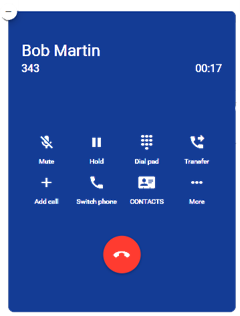
When a call is in progress, the status, dialed number, and call timer will be displayed at the top of the screen along with the following call functions:
- Mute – Disables the microphone.
- Hold – Places the other party on hold.
- Dial Pad – Enables you to use digits when dialing into an auto attendant/IVR.
- Transfer – Transfers the call with a choice to transfer blindly, without a call announcement, or with assisted transfer where the call is announced to the destination party.
- Add Call – Enables the user to create a second call that is separate from the first call. Once the second call is connected, you can merge the call in a three-way conference or keep the calls separate with the ability to swap between calls.
- Switch Phone – Moves the call to other devices you own that support Hosted Voice calls.
- Contacts – Opens the Contacts screen, which enables you to make a second call, and then optionally merge (conference) or transfer the call.
- More – Launches a new window with options to hide call, return to the main view of contacts/history/voicemail, or to start recording for on-demand call recording, if enabled on your account.